
API tokens
API tokens authenticate programmatic access to SysReptor: the REST API, reptor, and automation.
How much a token can do depends on its mode (see Token modes):
- User permissions: same effective permissions and project memberships as the creating user.
- Restricted permissions: only an explicit allow-list of permissions, optionally limited to selected projects.
- Admin permissions: full admin access without re-elevation (superuser session required to create).
Create and authenticate
Create and revoke tokens in User profile → API Tokens (/users/self/apitokens/).
Copy the token after creation; it is shown only once. Authenticate requests with:
Authorization: Bearer <token>curl -H "Authorization: Bearer <token>" \
https://sysreptor.example.com/api/v1/pentestusers/self/Tokens cannot be edited after creation. To change name, expiry, or scope, revoke the token and create a replacement.
No API token (regardless of permissions) is allowed to manage other API tokens, MFA methods, identities, or archiving public keys; change passwords; or enable or disable admin mode. Use a web session for those operations.
Administrators and User Managers can inspect and revoke other users' tokens in user management.
Token permissions
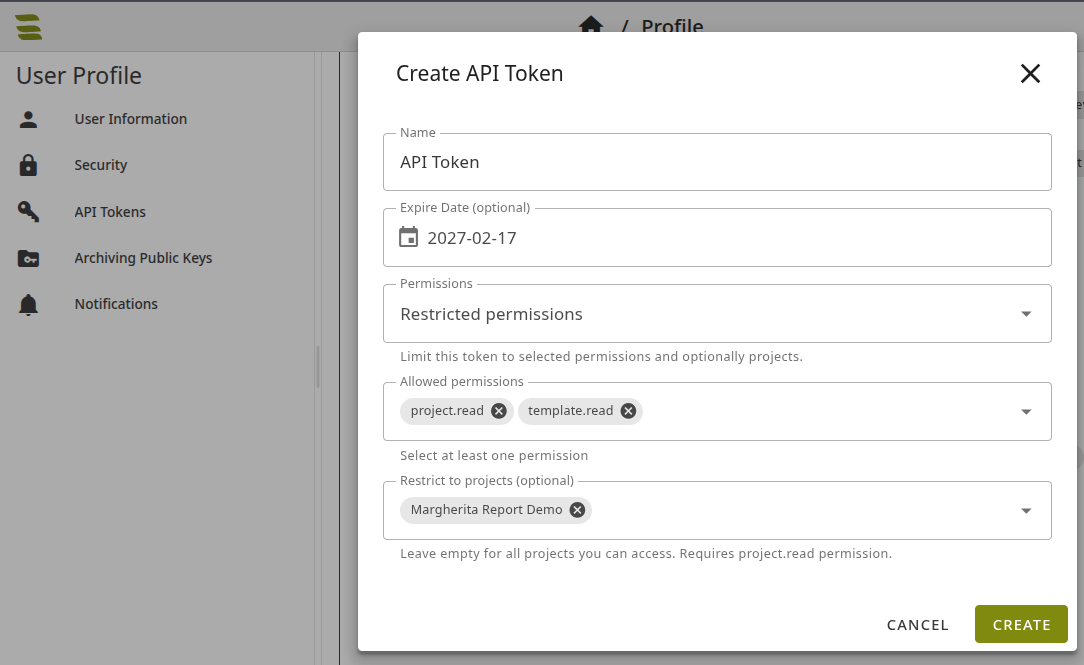
In Create API Token, choose Permissions:
Admin permissions
Available when your current session has admin mode enabled. The token keeps full admin access without re-elevation. Cannot be combined with a permission or project allow-list.
User permissions
Unrestricted token using your current role permissions and project memberships. Permissions are re-evaluated on every request as the user's roles change.
Restricted permissions
Pro onlyExplicit allow-list of permissions, optionally further limited to selected projects. In the UI, select at least one permission. You can only select permissions you currently have; elevated admin mode does not expand the allow-list.