
AI Agent
The AI agent assists with pentest report writing and analysis. It can answer questions about your project, suggest and review content, create and edit findings and sections.
To be able to use the agent, enable it in applications settings and configure an LLM provider (see configuration). Multiple LLM providers and also self-hosted models are supported.

The agent has access to project data through context and tools.
Project scoping
The SysReptor AI agent is bound to the current pentest project only.
It can:
- Read that project's structure, report sections, findings, notes, and the project's design field definitions
- See which section, finding, or note you currently have open in the UI
- Analyze screenshots and images referenced in markdown texts (when a vision-capable LLM is configured)
- Search finding templates in the instance knowledge base (templates are shared, not limited to one project)
It cannot:
- Read or edit other projects
- Access other users' private data, instance admin settings, or findings and notes that belong to a different project
Agent Mode
- Ask: Read-only. The agent can view the project and answer questions or suggest text. It does not create or edit any data; you copy and apply suggestions yourself.
- Agent (Pro only): Full write access in this project. In addition to everything in Ask mode, the agent can create findings and notes and update section, finding, and note fields.
Asking clarifying questions
When information is missing or there are multiple valid approaches, the agent can pause and ask you a multiple-choice question. Pick an option (or type your own answer) to continue, or send a new message to skip the question.
AGENTS.md
You can give the agent reusable instructions with an AGENTS.md note:
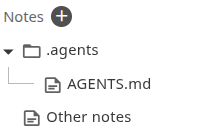
Place a .agents folder note at the root of the project notes tree, then add a child note titled AGENTS.md. Put your guidance in the note text as markdown e.g. tone, conventions, what to prioritize, and other project-specific instructions.
The full contents of AGENTS.md are loaded into the agent's system message at the start of every chat. Edits may not apply until you start a new chat. Edit the note in the notes UI.
Skills
For specialized, on-demand workflows you can add Agent Skills under the same .agents tree. Skills differ from AGENTS.md: only a short catalog is always visible; full instructions are loaded later, and only if the model decides a skill fits the task. See the agentskills.io guides on writing skills and optimizing descriptions for how to structure effective skills.
You can import the report-writing skill into project notes as a starting point.
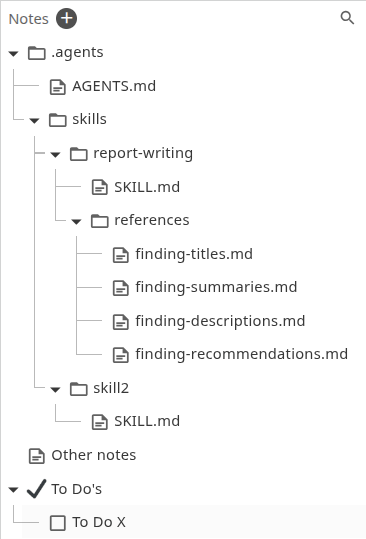
Each skill is a folder note under skills with a child note titled exactly SKILL.md. Put the skill frontmatter and instructions in the SKILL.md note body (markdown), for example:
---
name: my-skill
description: >
  Tells the agent when to use this skill.
  This is how the agent decides whether to activate it.
---

# My skill

Instructions the agent follows when the skill activatesAt the start of a chat the agent only sees each skill's name and description (from the catalog). It reads the full SKILL.md (and any supporting notes) only when it chooses to use that skill. A skill might not be picked up even if it would help. The LLM decides based on the description and the user's request.
How to improve skill descriptions
Optional sibling notes and nested notes under the skill folder are available as markdown files the agent can read (for example references.md or references/api.md). Scripts, binaries, and other non-note resources are not supported.
The skill catalog is loaded when the thread starts; new or changed skills may not appear until you start a new chat. Skill notes are normal notes: edit them in the notes UI.
Example Use Cases
- Generate executive summary from findings
- Write findings based on brief notes and screenshots using report writing skills
- Generate finding recommendation from technical description
- Review texts for grammar and spelling
- Create findings from notes
- Analyze the report and ask questions about it
- and much more