
Notifications
SysReptor provides a notification system to keep you informed about important events related to your projects and findings. In-app notifications are displayed in the menu bar of the web interface.
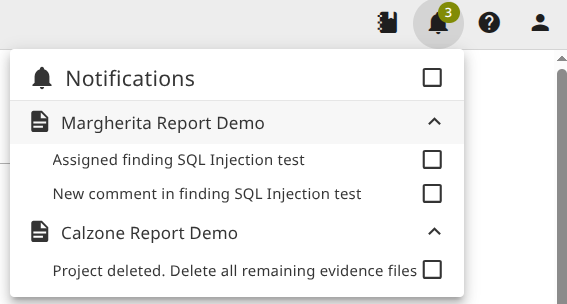
The menu bar shows only unread notifications. A full list (including already read) notifications is available in your user profile. Click the bell icon to temporarily hide notifications for uninterrupted work.
Notification Triggers
Notifications are created for following events:
- Added as a member to a project
- Assigned a finding, section, or note
- Commented on a finding/section assigned to you
- Mentioned in a comment via
@username - New replies in comment threads you are part of (created by you or mentioned)
- Project finished where you are a member
- Project deleted where you are a member
- Project archived where you are a member
- No backup created for more than 30 days
- Remote notification e.g. SysReptor update available
- Custom notifications created by superusers
Custom Notifications
Superusers can create custom notifications through the Django admin interface at /admin/notifications/customnotificationspec/ to inform users about announcements, maintenance windows, design changes, or other information.
Fields:
- Title (required): Notification title displayed to users
- Text (required): Main notification message body
- Link URL (optional): URL for more information or action
- Active Until (optional): Date when notification automatically expires
- Visible For Days (optional): Number of days notification remains visible per user. New users receive the notification with visibility starting from their creation date.
- User Conditions (optional): JSON filter for targeting specific users, e.g.
{"is_superuser": true}or{"is_designer": false}. Leave empty to target all users.
When both active_until and visible_for_days are set, the notification expires at whichever date comes first.