Comments and Review
Pro only
Before a report goes to the client, findings and sections usually pass through an internal review. Statuses and assignees show where each item stands and who owns it. On SysReptor Professional, comments let the team discuss specific report fields without leaving the editor.
Comments
Comments are available on report sections and findings. You can attach them to any report field (markdown, string, CVSS, and so on) or to a text selection inside a markdown field. Selection comments are highlighted in the editor and quoted in the sidebar.
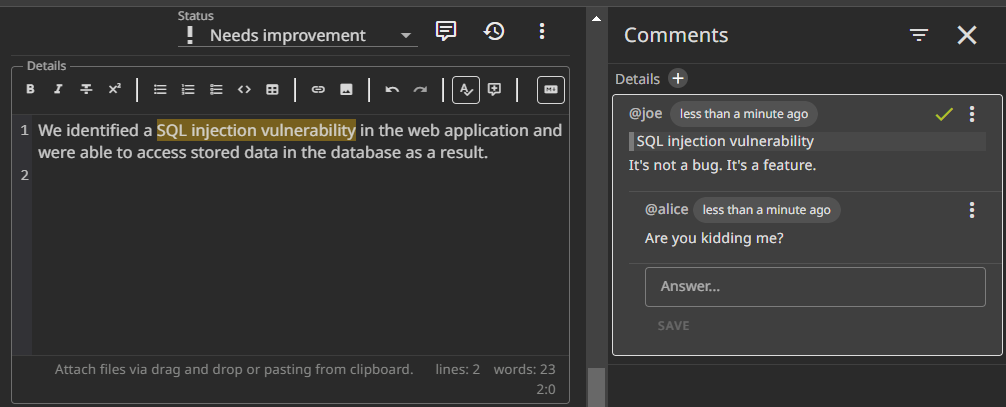
The Comments sidebar groups threads by field. Each comment supports replies.
@username mentions notify project members; assignees are notified when someone comments on their finding or section. See Notifications.
Comments sync in real time with collaborative editing on the same item.
Statuses
Every finding and report section has a status and an optional assignee (a project member).
Out of the box you get In progress, Ready for review, Needs improvement, and Finished. Your instance may show more if an admin added custom statuses.
Set status and assignee in the toolbar when you open a finding or section. The report sidebar shows both for every section and finding, so you can scan progress without opening each item. If your design defines a retest status field, that appears in the sidebar as well.
Marking one finding Finished is not the same as finishing the project. When you mark a project as finished in project settings, the whole project becomes read-only until someone reactivates it.
Custom status workflows
By default you can move between any status. Some teams want a fixed review flow — for example, In progress may only go to Ready for review, and only from there to Finished or Needs improvement.
Instance administrators configure that with STATUS_DEFINITIONS and allowed_next_statuses. Examples and the full option list are in Custom Statuses. Superusers with admin permissions can override restricted transitions when they need to correct a status.
Edit / View on GitHub